
Time:2025-12-25 Browse: 1
Touchscreens have become an indispensable bridge for human-computer interaction. From industrial control panels to smartphones, touch technology is ubiquitous. Currently, the most common touchscreens on the market are mainly resistive touchscreens and capacitive touchscreens. Each has unique working principles and characteristics, suitable for different scenarios. This article will deeply analyze the differences between resistive screens and capacitive screens from multiple dimensions such as core principles, appearance display, user experience, durability, and application scenarios, helping you choose a suitable product solution.
1. Core Working Principles
Resistive touchscreen: Its structure is like a "sandwich", consisting of two separate upper and lower conductive coatings (ITO films). When pressure is applied to the screen with a finger or any object, the upper film deforms and comes into contact with the lower layer, thereby forming an electrical circuit. The controller calculates the precise coordinate position by detecting changes in the resistance value at the contact point. It can be understood that the resistive screen is "pressure-sensitive".
Capacitive touchscreen: Its surface is a piece of glass uniformly coated with a conductive layer. When a finger approaches or touches the screen, it changes the electric field distribution on the screen's surface, causing a change in the capacitance value at the touch point. The controller locates the touch point by detecting this slight capacitance change. Therefore, the capacitive screen is "capacitance-sensitive".
2. Appearance and Display Effect
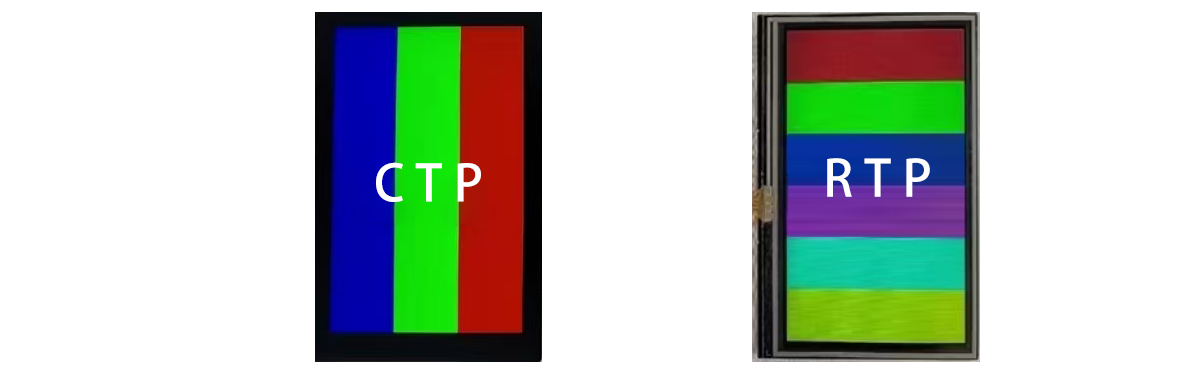
Resistive screen: The surface is a layer of flexible plastic conductive film, and a slight softness can be felt when touching the screen with a hand. Due to the presence of an air layer in its structure, light undergoes multiple refractions and reflections when passing through, resulting in low light transmittance. Therefore, the image on a resistive screen usually appears relatively hazy, and the brightness and clarity are compromised.
Capacitive screen: The surface is a single piece of hard glass (usually tempered glass). This structure has no air layer, allowing light to pass through directly and resulting in extremely high light transmittance. Therefore, the display effect of the capacitive screen is clearer, brighter, and has higher color reproduction, bringing users a better visual experience.
3. User Experience and Operation Methods
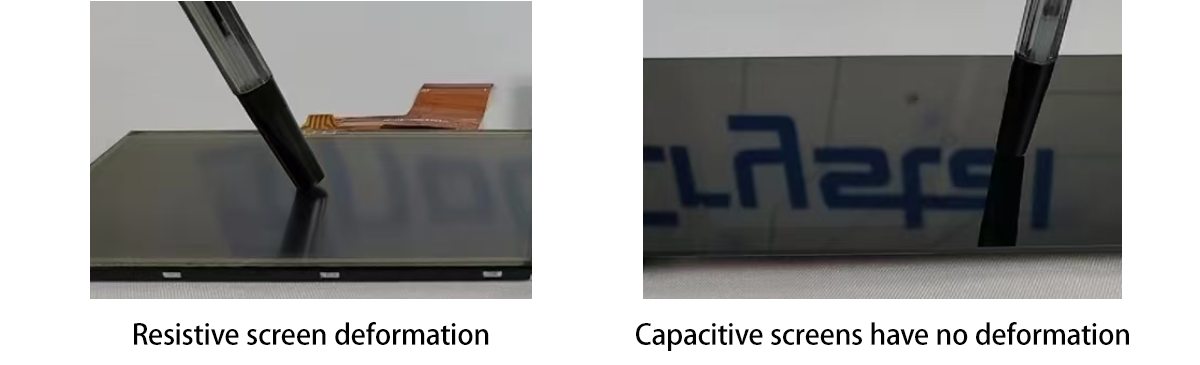
Resistive screen: ① Requires force; it must be pressed with a certain amount of force to deform the upper film to trigger the corresponding response; when pressed, a slight depression on the screen surface is visible to the naked eye. ② Not picky about tools; any object that can exert pressure can be used for operation, whether it is a finger, nail, or ordinary stylus, all can achieve precise touch control.
Capacitive screen: ① Light touch to reach; just place your finger gently on the screen to respond, no pressure required, and the operation is extremely smooth and natural. ② Supports multi-touch, can recognize multiple touch points at the same time, easily实现 complex gestures such as zooming and rotating, completely changing the way of human-computer interaction. ③ Dependent on conductors; the only drawback is that it must be triggered with a conductor (such as a finger), and ordinary plastic pen tips or gloves cannot be used for operation.
 4. Durability and Environmental Adaptability
Resistive screens: ① Poor anti-aging property. The ITO film on the surface is an organic material, which is sensitive to ultraviolet rays. It is prone to aging and yellowing after long-term use. ② Easily scratched. The hardness of the ITO film is much lower than that of glass, so the surface is easily scratched by hard objects. ③ Limited lifespan. Its working principle relies on the repeated deformation of the film, and long-term use can cause cracks in the ITO coating, affecting its lifespan.
Capacitive screens: ① Sturdy and durable. From the surface cover to the sensor, glass materials can be used, especially the application of tempered glass, which gives it extremely strong scratch resistance and impact resistance. ② Strong anti-aging property. Glass materials have stable chemical properties and strong UV resistance, so they are not easy to age. ③ Environmental restrictions. There are certain requirements for the usage environment. For example, non-conductive gloves, water stains or oil stains on the screen may interfere with touch accuracy.
5. Comparison of Application Scenarios
Advantageous fields of resistive screens: Industrial, medical, and outdoor environments
● Core values: Durable, cost-controllable, and not picky about operating tools.
● Typical applications: Industrial automation control panels (requiring operation with gloves), medical equipment (operable with disinfection pens), POS cash register systems, outdoor self-service query terminals, car navigation systems (early models), etc. It solves the problem of "whether there is touch" in specific harsh environments.
Advantageous fields of capacitive screens: Consumer electronics and modern smart devices
● Core values: Excellent display effect, smooth multi-touch experience, and modern appearance.
● Typical applications: Smartphones, tablets, smart watches, in-vehicle infotainment systems, smart home control panels, etc. It has brought a revolutionary leap in the "touch experience".